Voice journaling
Why Voice Dream Journaling Works So Well
A short recording script, a transcript example and the steps from speaking to a saved dream entry.
Voice dream journaling lets you capture fragments without composing a polished paragraph. It can be convenient when you wake with a sequence of images but do not want to type. It is a choice of format, not a guarantee that you will remember more than someone using paper.
What to say in your first recording
Begin with the clearest fragment. A useful script is: “I was in… The people were… What happened was… I felt… I’m unsure about…” Use whichever parts you remember and stop when you have captured them. You can download the morning entry template and keep it beside the bed as a cue.
Say “maybe” when you mean maybe. Repeated words, unfinished sentences and an uncertain ending belong in the record. You can add a title after capture.
The recording workflow in the app
- Open the journal and choose the recording action. Allow microphone and speech recognition access when prompted.
- Tap the microphone and describe what you remember. If speaking is inconvenient, choose Type your dream instead.
- Stop recording and open the saved entry. Review its title, transcript and mood tags; AI suggestions can be incomplete or wrong.
- Correct the transcript to match your memory. Keep any later explanation clearly labelled as reflection.
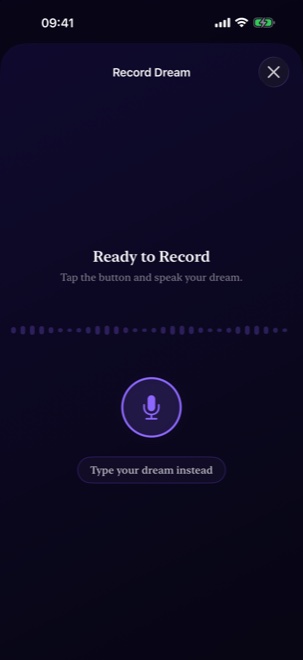
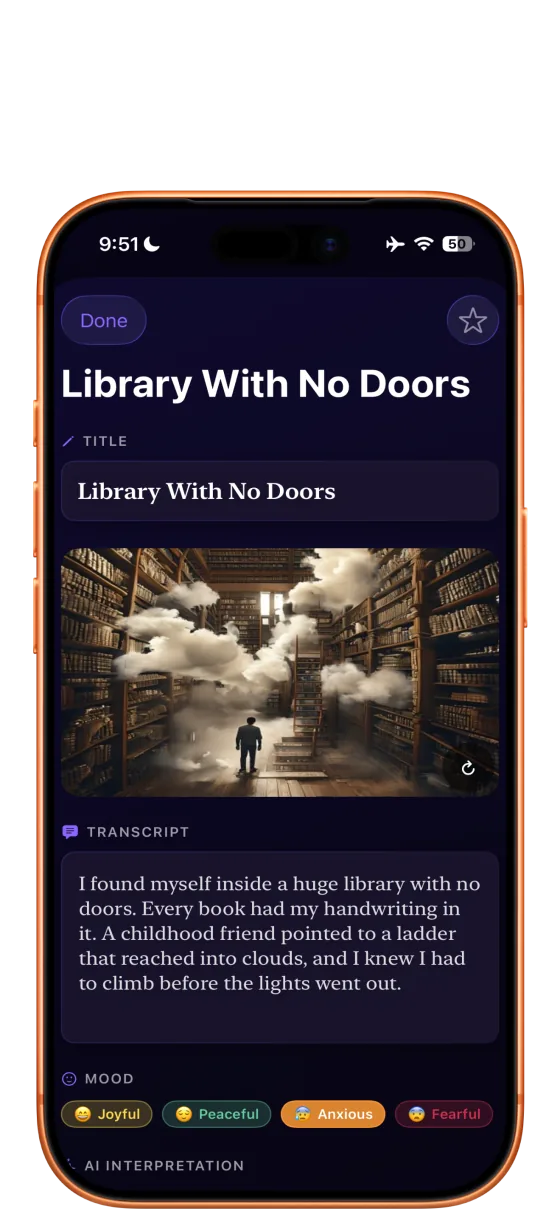
A spoken entry and a checked transcript
Fictional demonstration. The text below illustrates a possible transcription error. It is not a measured result from the speech recognizer.
“I was in a station, or maybe my old school. The signs kept changing. My friend had a yellow bag. I was looking for platform four. I felt hurried. I don’t remember finding a train.”
| Illustrative transcript | What to check |
|---|---|
| “looking for platform for” | If you remember the number, correct “for” to “four.” |
| “a station, or maybe my old school” | Keep both possibilities. Do not remove the uncertainty to make the story neater. |
| “I don’t remember finding a train” | Keep the missing ending. Do not write that a train arrived unless you recall it. |
After checking, label a separate reflection: “The urgency reminds me of this week’s deadline; I’m not sure that is connected.” The transcript records memory. The reflection records a later thought.
Voice, typing or paper?
| Format | Useful when | Watch for |
|---|---|---|
| Voice | Several fragments arrive together and speaking feels easy. | Recognition errors, background noise and waking someone nearby. |
| Typing | You need quiet, already have a short fragment, or prefer text. | Editing the story before recording the details. |
| Paper | You prefer a screen-free bedside routine. | Leaving the notebook out of reach or losing entries across loose sheets. |
Combine formats if that helps: write three words at waking, then expand them later with a note about the timing. Choose the method you can repeat comfortably.
Permissions, language and privacy
Recording needs microphone and speech recognition permission. Transcription uses Apple’s speech recognition and requests on-device recognition when supported for the device and language; availability can vary. The app’s interface languages and the speech recognizer’s supported languages are separate capabilities.
Journal entries and saved audio use local device storage. AI interpretation uses Apple’s on-device model on supported iOS/iPadOS 26 devices when the model and locale are available; otherwise dream text and context may be sent to xAI Grok. Illustration generation uses external services. Biometric protection locks access to the journal, but does not make cloud processing local. Read the data-handling details before recording sensitive information.
If speech is unavailable or its transcript is unreliable, use Type your dream instead. You can also use initials or neutral labels during capture and add names only if needed.
Build a routine around capture, then review
Keep the recording close to the remembered fragment rather than searching for an explanation immediately. Use the recall checklist when you wake blank, and the prompt guide when you want a specific question later.
Dream interpretation is personal and uncertain. These resources support journaling and reflection.